Your Next Hire Should Be an AI — Here's How a Nonprofit Did It in Two Weeks
How MACONA went from a one-person operation to a team of two — without adding headcount. An autonomous AI executive assistant managing email, social media, newsletters, and donor outreach 24/7 on dedicated hardware.
TL;DR
We deployed an autonomous AI executive assistant for a nonprofit in under two weeks. She runs eight scheduled programs daily — morning briefings, social media, donor research, newsletter drafts, content scouting, and end-of-day digests — all without being asked. The CEO went from drowning in operational work to just making decisions. The same pattern works for any small organization: medical practices, restaurants, law firms, conferences, mom-and-pop shops.
“The CEO’s time should be spent on decisions, not data entry. On strategy, not scheduling. On relationships, not routine.”
The Problem Every Small Organization Faces
MACONA is a 501©(3) nonprofit doing critical work in West Africa — school supplies, clean water, community development. Like most small organizations, the CEO wears every hat: grant writer, social media manager, email responder, newsletter editor, event planner, bookkeeper.
Sound familiar? Whether you run a nonprofit, a medical practice, a restaurant, a law firm, or a conference — if you have fewer than 10 people, someone on your team is drowning in operational work that keeps the lights on but doesn’t move the mission forward.
What We Built: Mimi, the AI Executive Assistant
We deployed Mimi — an autonomous AI agent running on dedicated hardware — in under two weeks. Not a chatbot. Not a template. A fully operational team member who executes real work across real systems, every single day.
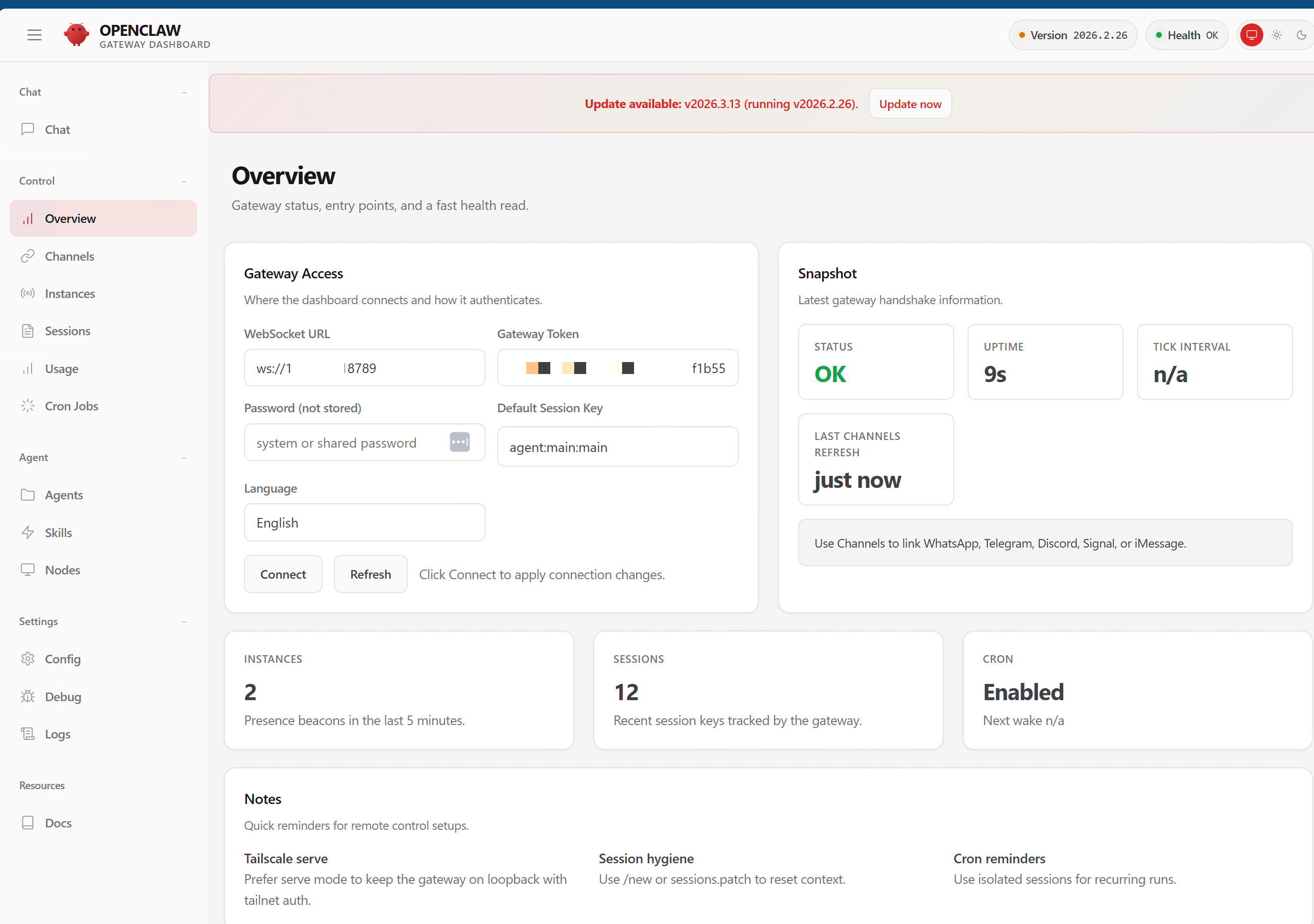
Here is what Mimi’s command center looks like:
 The OpenClaw gateway dashboard. Status: OK. Cron jobs: Enabled. Sessions: 12 active. This is Mimi’s nervous system — always on, always healthy.
What Mimi Actually Does (Every Day, Without Being Asked)
This is not a tool the CEO has to remember to open. Mimi runs four autonomous programs on a daily schedule — Monday through Friday, weekends off:
Morning Briefing (7:55 AM): Mimi checks email, reviews the calendar, flags anything urgent, and sends a summary to the CEO’s phone before the day starts.
Content and Social Media: Mimi scouts for relevant news, upcoming awareness days, and content opportunities. She drafts social posts, publishes blog articles to WordPress, and maintains the LinkedIn and Twitter presence.
Donor Research and Outreach: Mimi researches corporate giving programs, finds named contacts at target companies, drafts personalized outreach emails, and stages them for the CEO’s approval.
End-of-Day Digest: Every evening, Mimi reports what she completed, what is pending, and what needs a human decision.
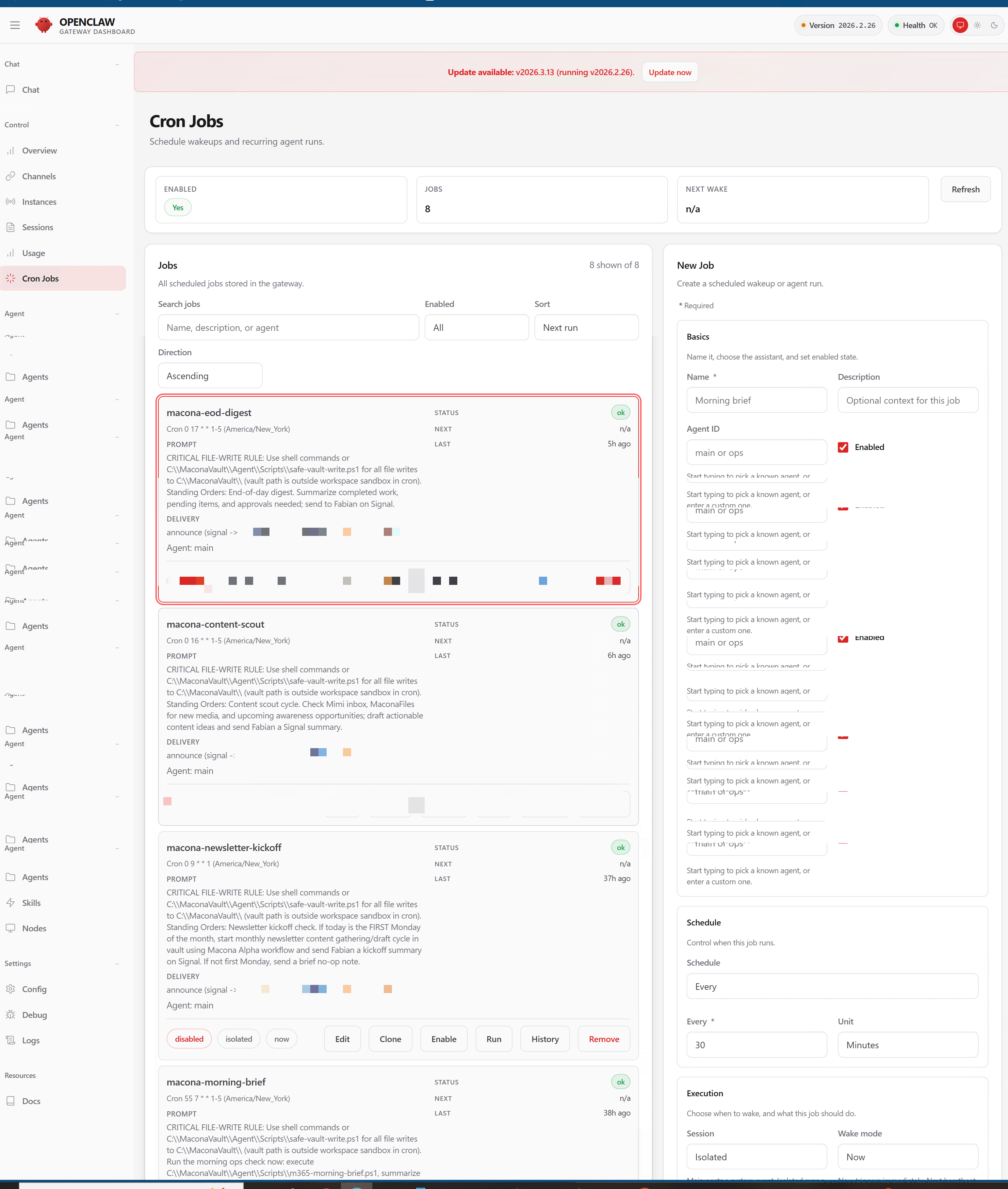 Eight cron jobs — the heartbeat of the operation. Each one fires on schedule, executes its program, and delivers results via Signal. EOD digest, content scout, morning brief, newsletter kickoff — all running autonomously.
How the CEO Communicates: A Text Message
No dashboards to check. No apps to learn. The CEO communicates with Mimi through Signal — the same encrypted messenger she already uses. Need something done? Send a text. Want a status update? Ask. It is that simple.
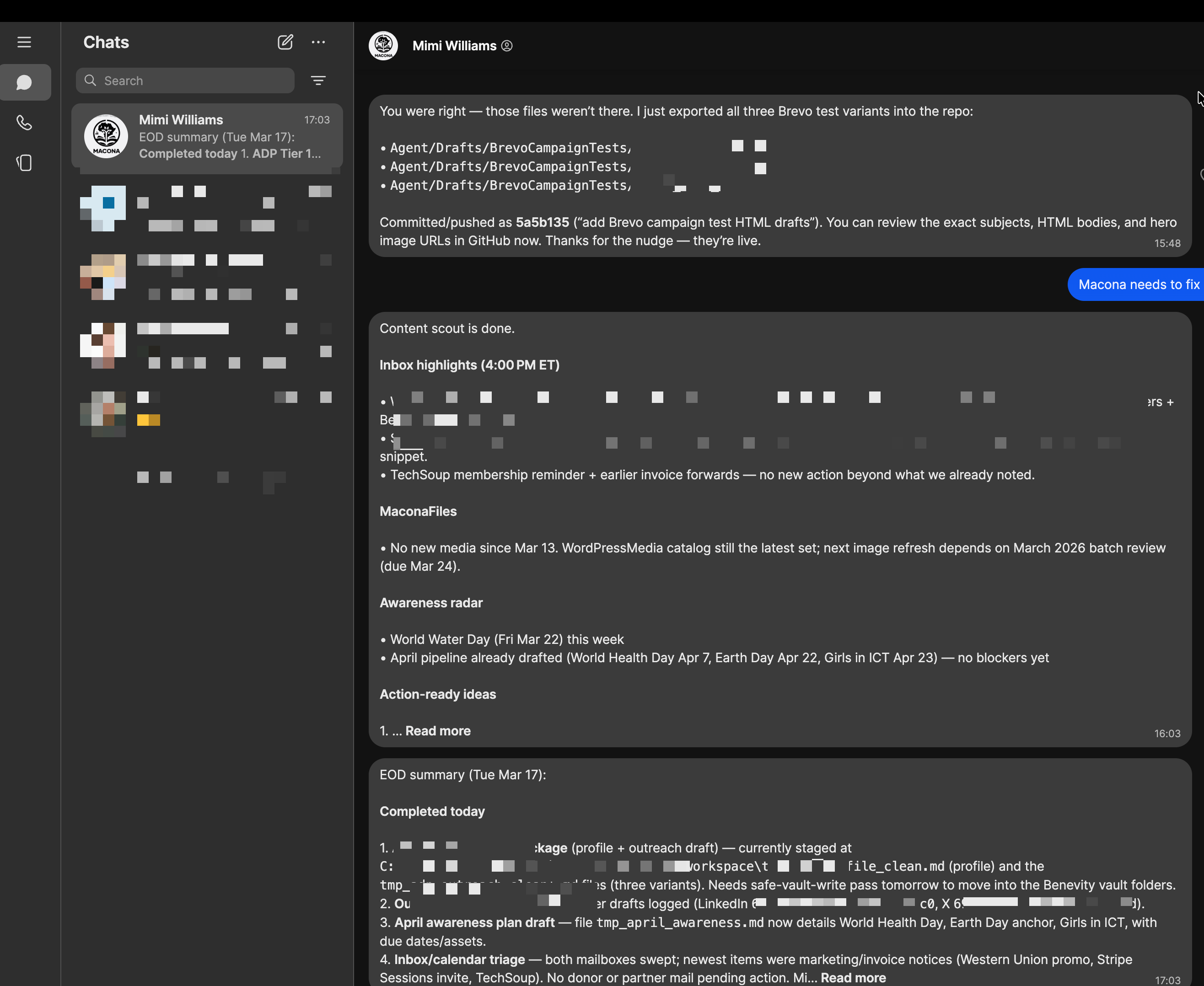 A real Signal conversation. Mimi reports her EOD summary: completed tasks, inbox highlights, awareness radar for upcoming events, and action-ready ideas. The CEO reads it like a text from a colleague.
The communication channel is configured directly in the gateway — secure, private, and always connected:
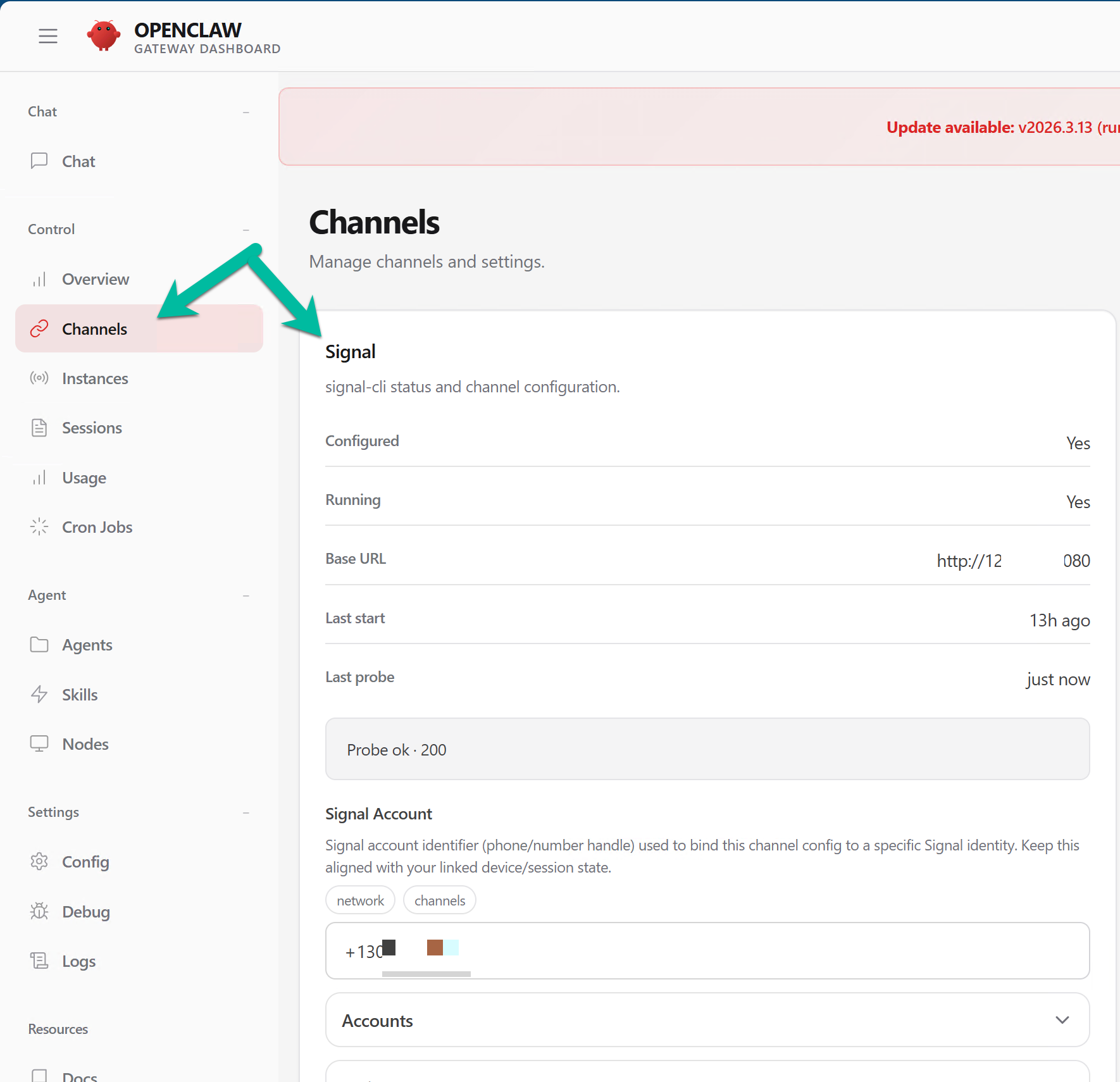 Signal channel: Configured, Running, Probe OK. The CEO’s phone number is the only authorized sender. Nobody else can command Mimi.
The Results
In the first month of operation:
- LinkedIn followers increased as Mimi maintained a consistent posting cadence that no human volunteer could sustain
- Donor inquiries went up — personalized outreach emails with real research behind them get responses
- Awareness and visibility grew — blog posts published on schedule, awareness days never missed, social presence always active
- The CEO went from doing everything to making decisions — reviewing drafts, approving sends, steering strategy instead of typing it all herself
- The tech support volunteer just monitors dashboards and tweaks prompts. The system runs itself.
The CEO’s job changed overnight. She went from spending her mornings triaging email and her evenings writing social posts to spending her mornings reviewing Mimi’s briefing and her evenings approving content Mimi already drafted.
That is the shift: from toil to decisions.
This Is Not Just for Nonprofits
We built the same system twice — once for MACONA on Windows with Signal, and once as a family assistant on a Mac Mini using iMessage:
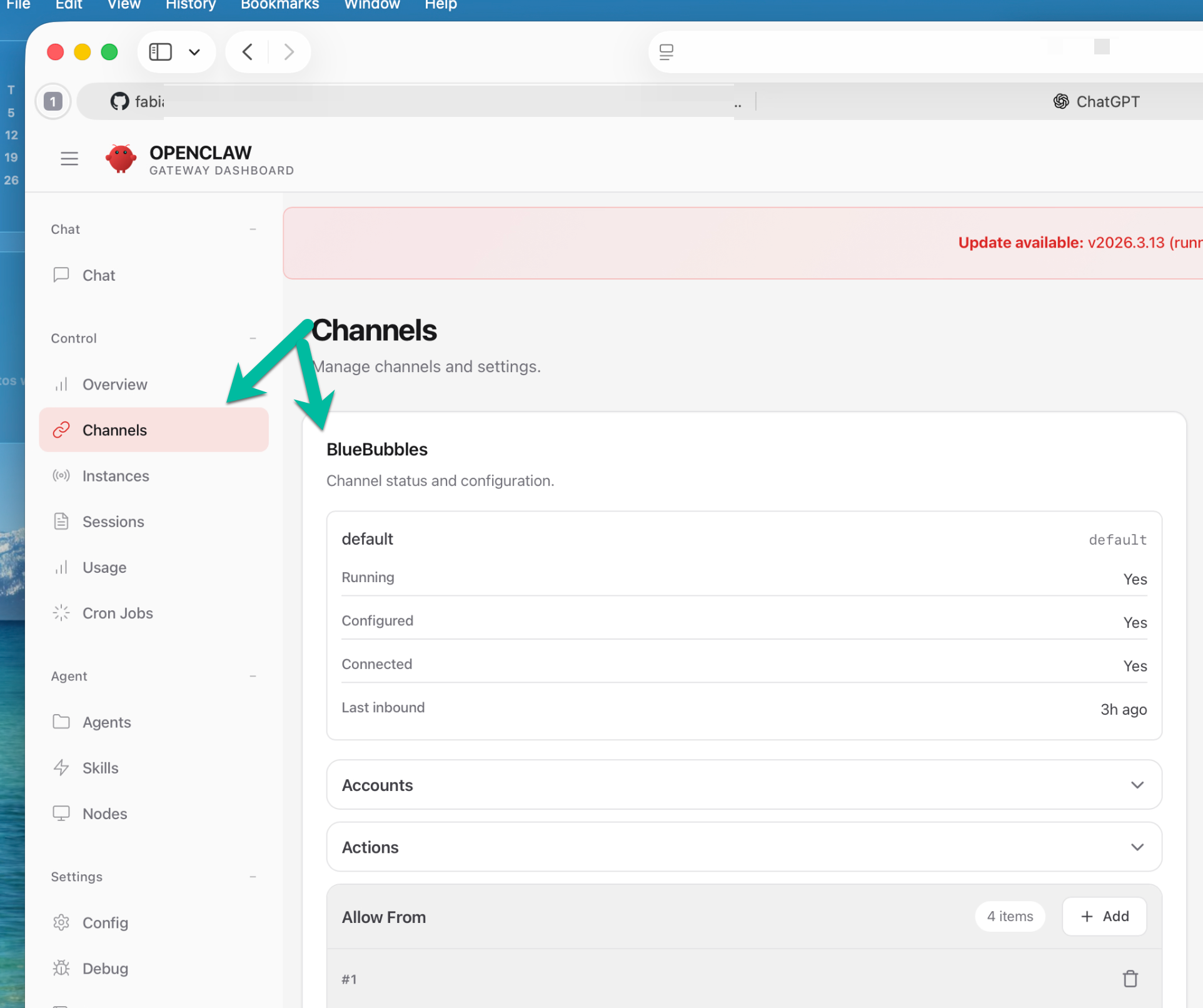 A second deployment: Ada, a family AI assistant running on a Mac Mini. Same architecture, different channel — iMessage via BlueBubbles instead of Signal. Four family members, tiered access, homework help for the kids, budget summaries for the parents.
The pattern works for any organization where one or two people are buried in operational overhead:
| Who You Are | What the AI Handles |
|---|---|
| Solo medical practice | Appointment reminders, patient follow-ups, insurance pre-auth tracking, after-hours triage routing |
| Restaurant owner | Vendor ordering, staff scheduling reminders, social media, review responses, daily sales summary |
| Law firm (small) | Client intake follow-ups, deadline tracking, document status updates, billing reminders |
| Conference organizer | Speaker logistics, attendee comms, sponsor follow-ups, session scheduling, post-event surveys |
| Professional services | Proposal follow-ups, project status digests, timesheet reminders, client communication |
| Mom-and-pop retail | Inventory alerts, supplier reorders, social posts, customer loyalty follow-ups |
The hardware cost is a one-time purchase (a Mac Mini or a small Windows PC). The AI model runs through a standard API subscription. No cloud servers to manage. No IT department required. The data stays on your hardware — not in someone else’s cloud.
How It Works (Without the Jargon)
The system has three pieces:
A brain — an organized folder of notes that contains everything the AI needs to know: who it works for, what it is allowed to do, how to talk to people, and what tasks to run on schedule.
A body — the OpenClaw gateway running on a dedicated machine. This is the engine that connects the AI’s brain to the outside world: email, social media, messaging, blogs, newsletters.
A voice — whatever messaging app you already use. Signal, iMessage, WhatsApp, Telegram, Discord. The CEO texts the AI like they would text a colleague. The AI texts back.
Set it up once. Teach it your operations. Let it run.
What This Costs
Straight talk:
- Hardware: $500-800 one-time (Mac Mini or refurbished Windows mini-PC)
- AI model: $20-50/month (API usage — scales with how much work the agent does)
- Setup by Adotob: We build it, configure it, train it on your operations, and hand you the keys
- Ongoing: You own the hardware. You own the data. We are available for adjustments, but the system is designed to run independently.
Compare that to a part-time virtual assistant at $1,500-3,000/month who works business hours, needs training, takes vacation, and might quit.
Ready to See It in Action?
We are not selling a product. We are offering a service: we will build your AI executive assistant, deploy it on your hardware, and train it on your specific operations.
Every deployment is custom because every organization is different. But the pattern is proven — MACONA went from zero to fully autonomous in under two weeks.
Want a 15-minute demo? We will show you exactly what Mimi does for MACONA and map it to your operations.
Book a Demo | Visit adotob.com | Email fabian@adotob.com
Adotob, LLC — Columbia, Maryland We build production software in days, not months.